ERNIE Image Prompt Complete Guide: 8 Core Scenarios × 50+ Practical Prompt Examples
Based on hands-on testing of ERNIE Image, Baidu's open-source 8B text-to-image model. This guide covers product photography, movie posters, comic storyboarding, e-commerce banners, infographics, UI prototypes, scene concept art, and character design — with full prompt templates.
What Is ERNIE Image?
ERNIE Image is an open-source text-to-image generation model developed by Baidu's ERNIE team. Built on a single-stream Diffusion Transformer (DiT) architecture, it has only 8 billion parameters yet runs smoothly on consumer-grade GPUs with 24GB VRAM under the Apache 2.0 license.
Its standout advantage is text rendering within generated images — scoring 0.9733 on LongText-Bench, placing it among the top globally. It accurately renders Chinese, English, Japanese, and Korean text, complex layouts, and dense typography, which are known pain points for mainstream diffusion models. ERNIE Image handles text as structured positional tokens via its DiT architecture, achieving industry-leading results.
ERNIE Image also supports a Prompt Enhancer — it automatically expands your brief descriptions into richly structured prompts with professional terminology for lighting, composition, and style, helping you get higher-quality results with fewer words.
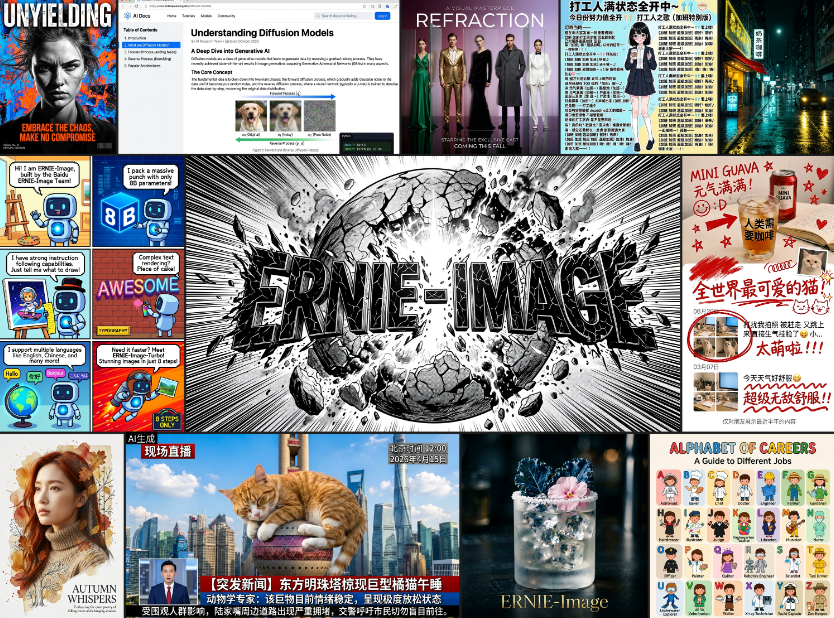
ERNIE Image official examples: multi-style, multi-scenario high-quality generation capability.
This guide skips the technical theory and focuses on one thing: how to use ERNIE Image prompts to generate the exact images you want.
Core Principles of Writing ERNIE Image Prompts
Before diving into specific scenarios, master these three principles. Following them will dramatically improve your results.
Principle 1: Treat Prompts as Creative Directives, Not Search Queries
AI image generators don't work like search engines — they interpret your prompt as a creative instruction. The more specific and structured your description, the more controllable the output.
Principle 2: Structure Your Prompt
An effective ERNIE Image prompt typically contains five elements:
- Subject: What is the core object in the scene?
- Action/Context: What is the subject doing? What environment is it in?
- Style: Photograph? Illustration? Cinematic?
- Lighting: Natural light? Neon? Backlight?
- Quality: 4K, photorealistic, shallow depth of field, etc.
Example:
Basic prompt:
a forest

Improved prompt:
dense pine forest during golden hour, sunlight beams piercing through the canopy, misty atmosphere, rich greens and warm golden tones, natural photography style, 4K detail
Principle 3: Use Quotes to Precisely Control Text Rendering
One of ERNIE Image's strengths is rendering specific text within images. Wrap target text in double quotes and specify font style, size, and position.
Tip: Keep text to 8 words or fewer per image for reliable rendering.
Scenario 1: Product Photography — E-commerce & Product Showcase
Use cases: Product main images, catalogs, social media product promotions
Key elements: Lighting direction, material texture, lens specs, depth of field
Prompt Template
Close-up product photograph of [product description] on [material] surface, [light source direction] casting soft shadows, shallow depth of field, commercial photography style, [resolution]
Practical Examples
| Product | Prompt |
|---|---|
| Ceramic Coffee Mug | Close-up product photograph of a matte ceramic coffee mug on a white oak wood table, morning sunlight from the left casting soft shadows, shallow depth of field, commercial photography style, 8K detail |
| Smart Watch | Professional product shot of a smart watch on marble surface, soft studio lighting, minimal composition, subtle reflection, 85mm lens depth of field, clean white background |
| Artisan Bread | Overhead flat-lay of a rustic wooden board with artisan sourdough bread, olive oil, fresh herbs, and sea salt flakes, natural light from above, food magazine editorial style, warm color palette |
| Perfume Bottle | Luxury perfume bottle on polished black glass surface, dramatic side lighting creating long shadows, moody dark atmosphere, high-end commercial photography, 4K, macro lens |
Scenario 2: Movie Posters — Title Text + Visual Impact
Use cases: Movie posters, concert posters, event promotional graphics
Key elements: Composition, title text, tagline, atmosphere
ERNIE Image's title text rendering is one of its most celebrated capabilities. Compared to Midjourney and Stable Diffusion, which often produce misspelled text, ERNIE Image renders large headlines with precision.
Prompt Template
[genre] movie poster, [core scene description], title "[title text]" in [font style] at [position], subtitle "[subtitle text]" in [font style] at [position], [lighting/atmosphere]
Practical Examples
| Genre | Prompt |
|---|---|
| Sci-Fi Thriller | Movie poster for a sci-fi thriller set in 2087 Tokyo, neon-lit rain-soaked streets, lone figure in trench coat standing under a flickering sign, title "ECLIPSE" in bold white serif font at the top, tagline "The truth has two sides" in smaller italic text at the bottom, volumetric fog, cinematic lighting, 35mm film grain |
| Action Adventure | Adventure movie poster, ancient temple ruins overgrown with vines in misty jungle, golden light beams breaking through canopy, title "LEGEND" in distressed serif font at the top, release date in small text at bottom, epic scale, color graded in warm oranges and deep greens, blockbuster aesthetic |
| Suspense Noir | Film noir style movie poster, shadowy figure reflected in rain puddle on dark city street, single streetlight creating dramatic pools of light and shadow, title in bold white letters at the top, tagline in small italic text at bottom, high contrast black and white with red accents |
Scenario 3: Comics & Storyboards — Best in Open-Source Models
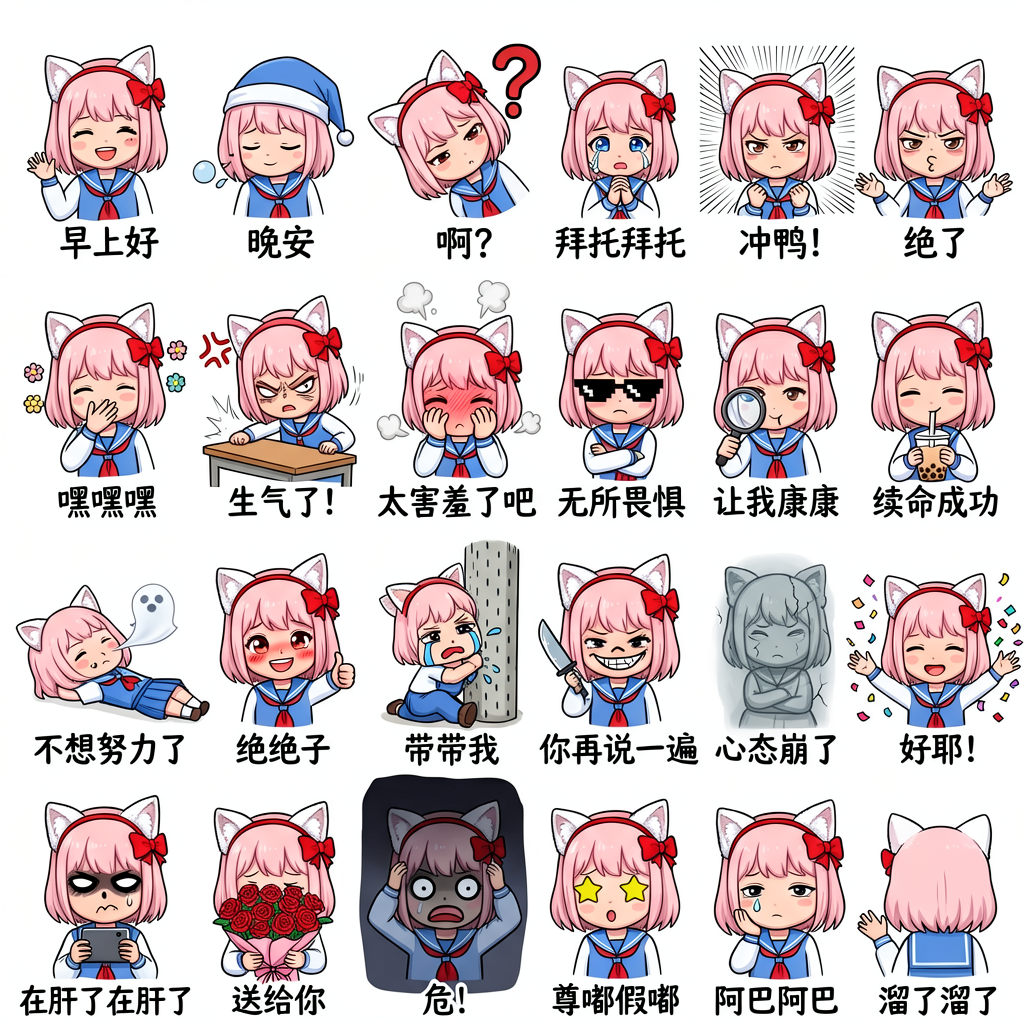
Use cases: Independent comic creation, storyboards, emoji packs, visual storytelling
Key elements: Panel layout, screentone shading, speech bubbles, character consistency
ERNIE Image excels at comic-style generation — it can simultaneously render panel layouts, screentone textures, speech bubbles, and Japanese/Chinese text, placing it near the top tier among open-source models.
Prompt Template
[number] panel comic page, [scene description], [style reference] aesthetic, [lighting], speech bubbles containing [text content]
Practical Examples
| Scenario | Prompt |
|---|---|
| Sci-Fi Comic | A 6-panel cinematic sci-fi comic page, retro-futuristic space exploration art, dramatic lighting with starfields and glowing planets, detailed panel borders, screentone shading, speech bubbles with English text, comic book aesthetic, high contrast |
| Anime Style | Anime-style illustration of a cheerful girl with short brown hair, wearing a blue school uniform, sunlit classroom background, Studio Ghibli aesthetic, soft watercolor tones, delicate line work, natural expression, pastel color palette |
| Action Manga | Dynamic manga action panel, character in mid-air combat pose, speed lines radiating outward, explosive impact effect, black and white ink with screentone shading, dramatic angle, motion blur lines, shonen manga style |
| Comic Strip | 4-panel comic strip showing a cat discovering a portal to a miniature world in a cardboard box, the cat looking surprised in panel 1, curious in panel 2, entering in panel 3, exploring in panel 4, cute cartoon style with speech bubbles |
Scenario 4: E-commerce Banners — Marketing Material with Text
Use cases: Homepage banners, promotional graphics, social media ads
Key elements: Brand text, promotional information, CTA buttons, typographic hierarchy
Prompt Template
[scene] background, [product/subject], heading "[heading text]" in [font/size] at [position], subtitle "[subtitle text]", [atmosphere/lighting], [resolution]
Practical Examples
| Promotion | Prompt |
|---|---|
| New Arrival | Minimalist product banner, matte white background, centered bold heading "NEW ARRIVAL" in clean sans-serif font, single rose-colored product jar in center, soft natural lighting, clean e-commerce photography, high resolution |
| Flash Sale | E-commerce sale banner with gradient purple and pink background, centered text "SUMMER SALE 50% OFF" in bold white font at top, product silhouettes arranged below, clean modern design, promotional aesthetic, 4K resolution |
| Brand Campaign | Luxury brand banner for a skincare line, cream-colored marble texture background, gold foil text "PURE GLOW" in elegant serif font, three product bottles arranged diagonally, soft golden hour lighting, high-end aesthetic, 4K |
Scenario 5: Infographics — Data Visualization with Labels
Use cases: Educational materials, science illustrations, business flowcharts, data visualization
Key elements: Clear labels, structured layout, connecting arrows, multi-region headings
This is another core advantage of ERNIE Image — dense multi-language, multi-label, multi-region text rendering.
Prompt Template
Infographic on [topic] with [number] labeled sections: [section1], [section2], [section3], connected via [connector style], heading "[main heading]" at [position], [style]
Practical Examples
| Topic | Prompt |
|---|---|
| Water Cycle | Infographic titled "THE WATER CYCLE" with four labeled sections: Evaporation, Condensation, Precipitation, Collection, connected by curved arrows, clean blue and white color scheme, minimal flat design style, educational illustration, 4K, clear typography for all labels |
| How AI Works | Educational diagram titled "How AI Works" showing three connected stages: Data Input, Neural Network Processing, Output Prediction, flowing left to right with arrows between stages, each stage has a labeled icon box, clean modern tech aesthetic, blue and white color palette, professional infographic |
| Organization Chart | Organizational chart infographic titled "Company Structure" showing CEO at top with three departments below (Engineering, Marketing, Sales), each department has two team members listed, clean hierarchical layout, professional business style, blue and gray color scheme |
Scenario 6: UI/UX Prototypes — Interfaces with Legible Text
Use cases: App interface design, web prototypes, dashboard wireframes
Key elements: UI element arrangement, readable text, component layout
ERNIE Image can generate pixel-accurate interface mockups — text, icons, and navigation layouts are all rendered precisely, far exceeding mainstream open-source models' UI generation capability.
Prompt Template
[device type] screen showing [app name/scenario] interface, top showing [top elements], main content area containing [core content], bottom showing [bottom elements], [design style], [color scheme]
Practical Examples
| Interface | Prompt |
|---|---|
| Health App | Mobile app screen showing a fitness tracking app, header "Good morning, Alex" at the top, central circular progress ring showing "8,432 STEPS" with green accent color, step count and time metrics below, clean white background, modern minimalist UI design, 4K |
| E-commerce Home | Mobile app screen showing a shopping app home page, top navigation bar with search icon and cart icon, category tabs below: Electronics, Fashion, Home, Beauty, featured product card in center with image and price, clean white UI design, flat design, high resolution |
| Music Player | Smartphone screen showing a music player app, album art in center with play/pause button overlay, song title "Midnight Jazz" and artist name below, progress bar at bottom showing 3:24 of 4:58, volume slider on right side, dark theme with purple accent, modern UI |
Scenario 7: Scene Concept Art — Sci-Fi, Fantasy & Steampunk
Use cases: Game concept art, film pre-visualization, world-building
Key elements: Spatial consistency, environmental layering, lighting direction, atmosphere
Prompt Template
[environment] concept art, [subject] in [setting], [distant elements], [lighting effect], [style reference], [lens/composition]
Practical Examples
| Style | Prompt |
|---|---|
| Cyberpunk | Cyberpunk cityscape concept art, towering neon-lit skyscrapers reflecting in rain-soaked streets below, flying vehicles with light trails cutting through smog-filled sky, holographic advertisements in multiple languages, lone figure in glowing jacket standing on a rooftop overlooking the city, cinematic wide angle, 35mm lens, film grain, blade runner aesthetic |
| Fantasy | Epic fantasy concept art, massive ancient tree with glowing roots stretching deep underground, a lone wizard standing on a moss-covered stone bridge spanning an underground river, bioluminescent mushrooms illuminating the cavern walls, volumetric light shafts filtering from above, matte painting style, cinematic atmosphere, 4K |
| Post-Apocalyptic | Post-apocalyptic wasteland concept art, overgrown city ruins covered in ivy and wildflowers, broken skyscrapers with vegetation growing through windows, a dirt road cutting through the center with abandoned cars half-buried in dirt, warm golden hour light casting long shadows, hopeful desolation aesthetic, wide panoramic composition |
| Steampunk | Steampunk airship floating above Victorian London, massive brass and copper vessel with billowing canvas sails and rotating propellers, smoke stacks releasing golden smoke, below the city with clock towers and gas-lit streets, dramatic sunset sky with orange and purple hues, detailed mechanical components, cinematic angle |
Scenario 8: Character Design — Consistent Character Portraits
Use cases: IP characters, virtual idols, game NPCs, brand mascots
Key elements: Physical features, clothing, pose, consistency
Prompt Template
[style] character design, [gender/age], [physical details], wearing [clothing description], [pose], [background], [lighting]
Practical Examples
| Character | Prompt |
|---|---|
| Game NPC | Character design of a young female elven archer with long silver hair and pointed ears, wearing intricately detailed forest green leather armor with gold trim, holding a wooden bow with arrow nocked, standing in an enchanted forest clearing with dappled sunlight filtering through ancient oak trees, full body portrait, fantasy illustration style, high detail, 4K |
| Virtual Idol | Anime character design of a virtual idol singer, pink hair in twin tails with blue hair accessories, wearing a futuristic stage outfit with glowing neon patterns, holding a microphone with a confident pose, concert stage background with spotlights, vibrant colors, modern J-pop aesthetic, detailed illustration |
| Brand Mascot | Cute kawaii mascot character design of a round fluffy cloud with a smiling face, wearing a small blue rain hat and holding a tiny rainbow umbrella, soft pastel blue and pink color palette, chibi style, friendly and approachable, white background, clean vector art style, brand mascot design |
In-Depth: ERNIE Image Text Rendering
Why Does Text Rendering Matter?
Anyone who works with AI image generation knows this pain point: you can generate great characters, lighting, and atmosphere — but the moment you add a title, a sign, a button, or a UI element, most models start producing garbled, misspelled, or completely unreadable text.
ERNIE Image has proven its text rendering capability through benchmarks like LongText-Bench, where it ranks among the best in open-source models:
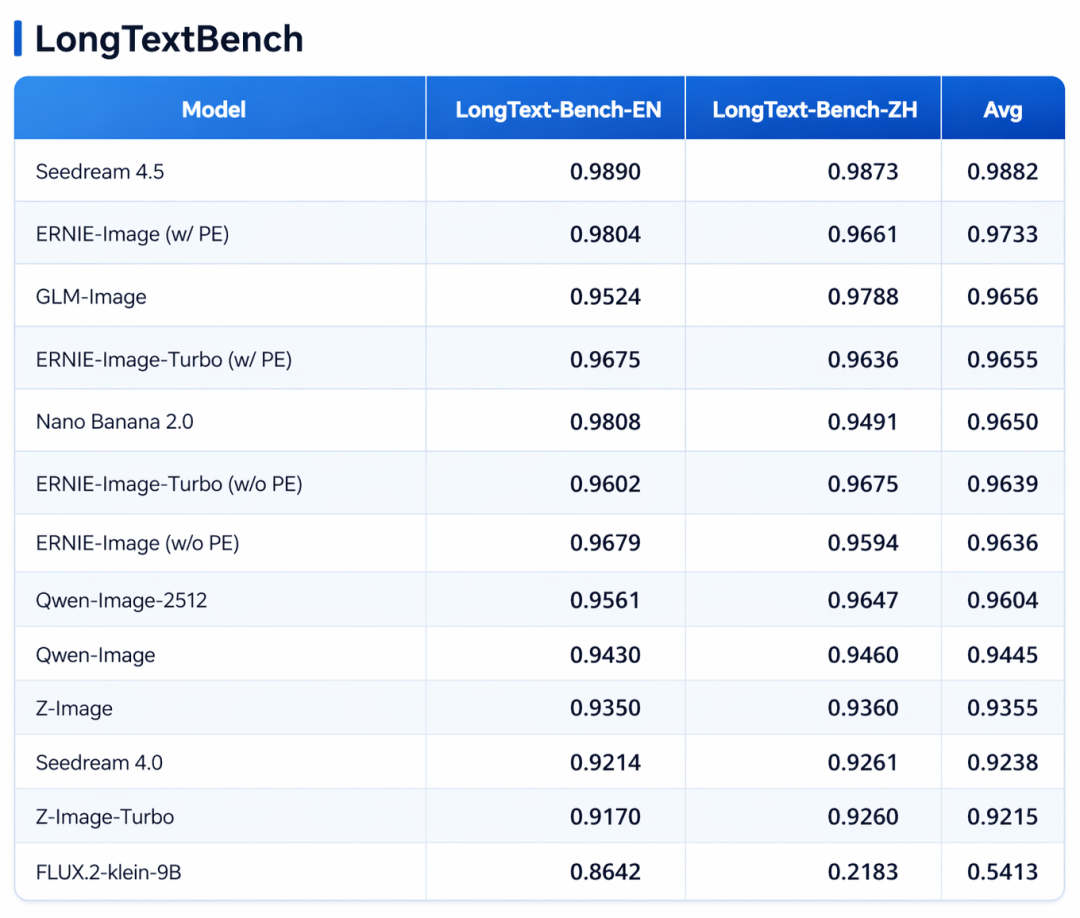
ERNIE Image text rendering benchmark (note: Seedream 4.5 is a closed-source model).
Official Text Rendering Examples
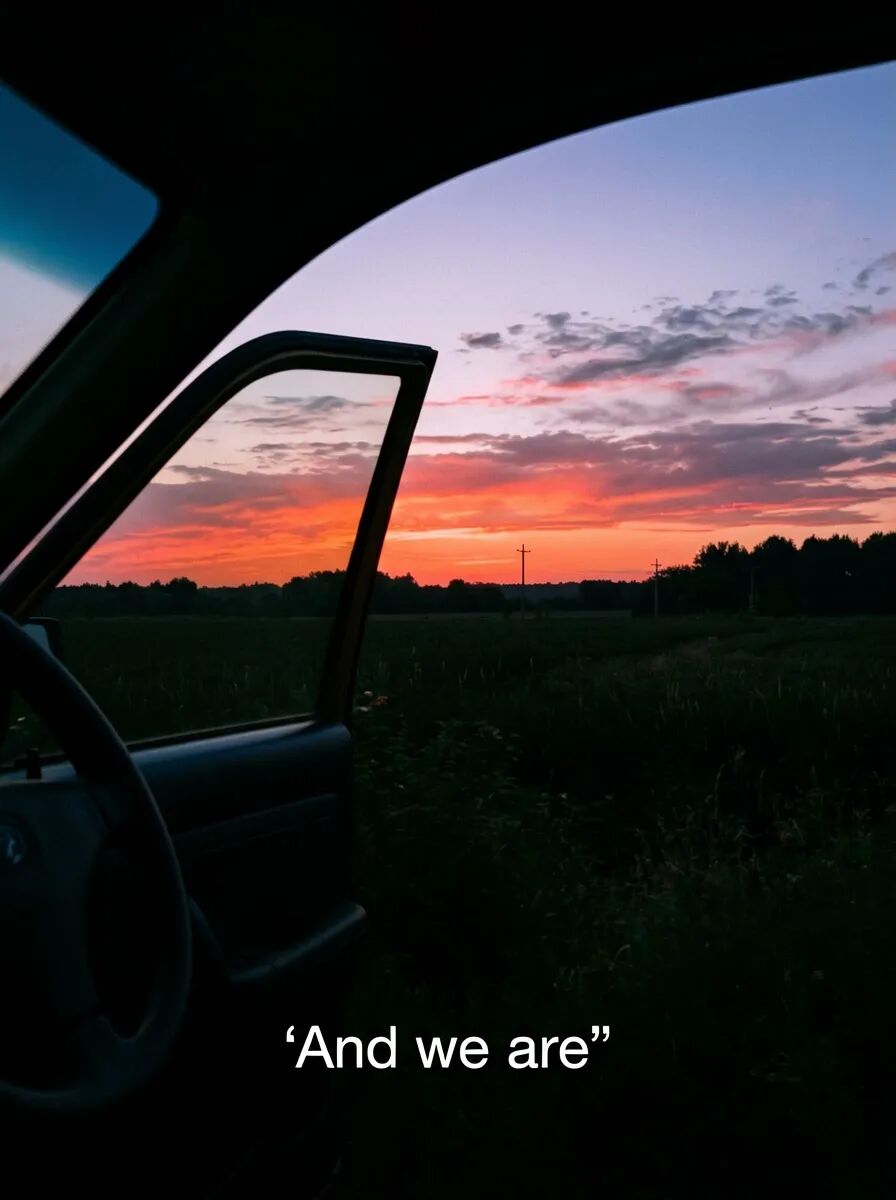
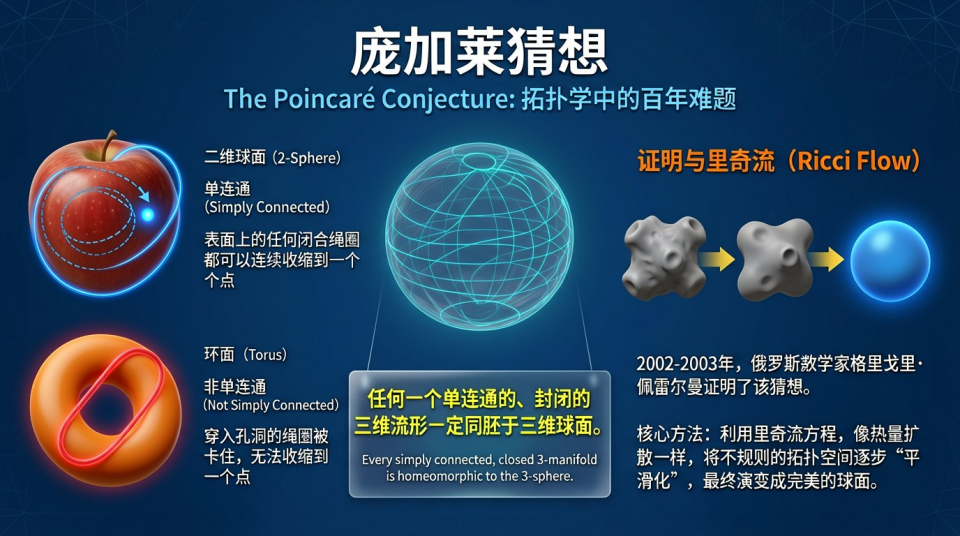
ERNIE Image official text rendering examples: clear bilingual titles, multi-language mixed layout, dense label infographics.
Best Practices for Text Rendering
- Wrap target text in quotes:
"ECLIPSE"is more reliably recognized as a rendering target than bareECLIPSE - Control text quantity: Limit to 8 words or fewer per image
- Specify font style:
bold serif font,clean sans-serif,handwritten style - Specify position:
at the top,in the center,at the bottom - Turn off Prompt Enhancer: Especially for Chinese text rendering, to prevent the enhancer from altering your text content
Advanced: How to Use Prompt Enhancer
ERNIE Image includes a built-in Prompt Enhancer that automatically expands your brief descriptions into more detailed, professionally styled art direction language.
When to Enable
✅ Enable when you have a simple idea and want the AI to automatically fill in lighting and style details
✅ Enable for beginners who want high-quality results from short descriptions
✅ Enable for quickly exploring different creative directions
When to Disable
❌ Disable when you need precise control over text rendering
❌ Disable when you already have a mature prompt and want to keep a fixed format for iteration
❌ Disable when using a fixed seed for fine-tuning
Recommended Workflow
Turbo for rapid iteration + Standard for final output
- Start with ERNIE Image Turbo (~8 steps) to quickly test multiple prompt variations
- Once you find the best prompt, switch to ERNIE Image Standard (50 steps) for final high-quality output
ERNIE Image Quick Parameter Reference
| Parameter | Standard Mode | Turbo Mode | Notes |
|---|---|---|---|
| Steps | Default 50 (1-100) | Fixed ~8 | 50 steps is optimal; beyond that, diminishing returns |
| Guidance Scale | Adjustable (0-20, default 4) | Fixed | >8 may cause oversaturation |
| Resolution | 64-2048 px (step 16) | Same | Recommended presets work well |
| Recommended Sizes | Square 1024×1024, Portrait 848×1264, Landscape 1264×848 | Same | Different ratios suit social, posters, banners |
| Prompt Enhancer | Default ON | Default ON | Disable for Chinese text rendering |
| Images per Request | 1-4 | Same | — |
| Max Prompt Length | 2048 characters | Same | — |
Who Is ERNIE Image For?
- E-commerce operators: Quickly generate product images and promotional banners with brand text
- Independent creators: Self-host at low cost under Apache 2.0, no subscription needed
- UI/UX designers: Rapidly produce text-bearing interface prototypes
- Comic illustrators: Assist with storyboard and character design generation
- Educational content creators: Generate infographics with clear text labels
- Game developers: Generate scene concept art and UI wireframes
Frequently Asked Questions
How does ERNIE Image differ from Midjourney?
ERNIE Image significantly outperforms Midjourney in text rendering and structured layout. Midjourney still holds an edge in stylized illustration, but ERNIE Image more accurately renders poster titles, UI text, and comic dialogue. Additionally, ERNIE Image is open-source and can be self-hosted locally.
ERNIE Image or Qwen Image — which is better?
Both are excellent open-source models from China. ERNIE Image ranks first in the LongText-Bench text rendering benchmark, and its DiT architecture provides a natural advantage for structured layout tasks. Qwen Image excels equally in general image quality and instruction following. Your choice depends on the use case — prioritize ERNIE Image when text rendering is critical; either works fine for general generation.
What hardware does ERNIE Image require?
The Standard model needs 24GB VRAM; the Turbo model runs on 12GB VRAM. The Unsloth GGUF quantization scheme can further reduce memory requirements.
Summary
ERNIE Image's core value isn't "generate any random pretty image" — it's precise control: precise text rendering, precise layout control, precise instruction following.
With the 8 scenarios and 50+ prompt templates covered here, you can already use ERNIE Image to produce professional-grade assets for e-commerce posters, comic storyboards, UI prototypes, infographics, and more.
Remember one formula: Clear subject description + specific text rendering instructions + well-chosen style/lighting/quality tags = high-quality ERNIE Image output.