ERNIE-Image 8B Open Source: 8B Parameters Achieving Top-Tier Text-to-Image with Precise Text Rendering
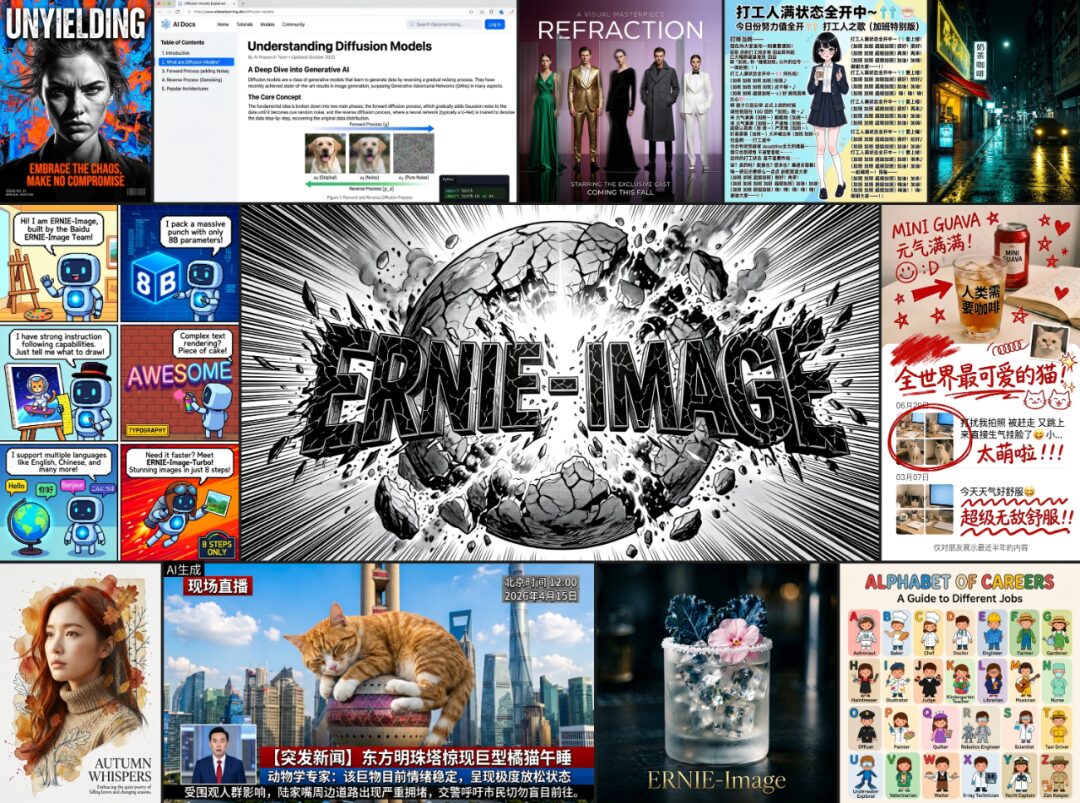
Baidu's Wenxin LLM team has open-sourced ERNIE-Image, an 8B-parameter text-to-image model based on a single-stream DiT architecture. It runs on consumer-grade GPUs with just 24GB VRAM, leading open-source models across mainstream benchmarks in instruction following and text rendering. It especially excels at highly controllable scenarios such as posters, comic storyboards, and multi-panel layouts. The team also released ERNIE-Image Turbo, generating high-fidelity images in just 8 inference steps. Model weights and inference code are fully open-sourced, with fast demo available on ModelScope.
Demo:
- ModelScope Studio: https://modelscope.cn/studios/PaddlePaddle/ERNIE-Image
Open Source:
- ERNIE-Image: https://modelscope.cn/models/PaddlePaddle/ERNIE-Image
- ERNIE-Image-Turbo: https://modelscope.cn/models/PaddlePaddle/ERNIE-Image-Turbo
Model Introduction
Based on DiT architecture, ERNIE-Image has 8 billion parameters (8B) and generates complex images comparable to top commercial models with just 24GB VRAM. It leads open-source models across GenEval, OneIG, and LongTextBench benchmarks, with overall performance approaching advanced models like NanoBanana and Seedream 4.5. The model shows significant advantages in complex instruction following and precise text rendering, covering diverse visual styles including anime, film photography, surrealism, silhouettes, and vintage photos.
Core Features:
Small model, strong performance
At only 8B parameters, it ranks #1 among open-source models on GenEval, OneIG, and LongTextBench, approaching the performance of the most advanced commercial-grade models.
Precise text rendering
Stable performance in high-density text, long text, and layout-sensitive text generation tasks. Supports multilingual text rendering (Chinese, English, etc.), ideal for text-heavy scenarios like posters, infographics, and UI-like images.
Complex instruction following
Maintains strong understanding and precise execution for prompts involving multi-subject relationships, detailed constraints, and knowledge-dense descriptions.
Standout structured generation
Better maintains layout logic and visual organization in structured visual tasks such as posters, comics, storyboards, and multi-panel images.
Diverse style coverage
Supports realistic photography, design-oriented images, anime, film photography, surrealism, silhouettes, vintage photos, and softer, more cinematic visual styles.
Consumer-grade hardware friendly
Deployable with 24GB VRAM, lowering the barrier for research and production use.


Prompt Enhancer
ERNIE-Image performs best with detailed, structured long prompts, but in practice, users often input only short descriptions, making it hard to fully leverage the model's capabilities.
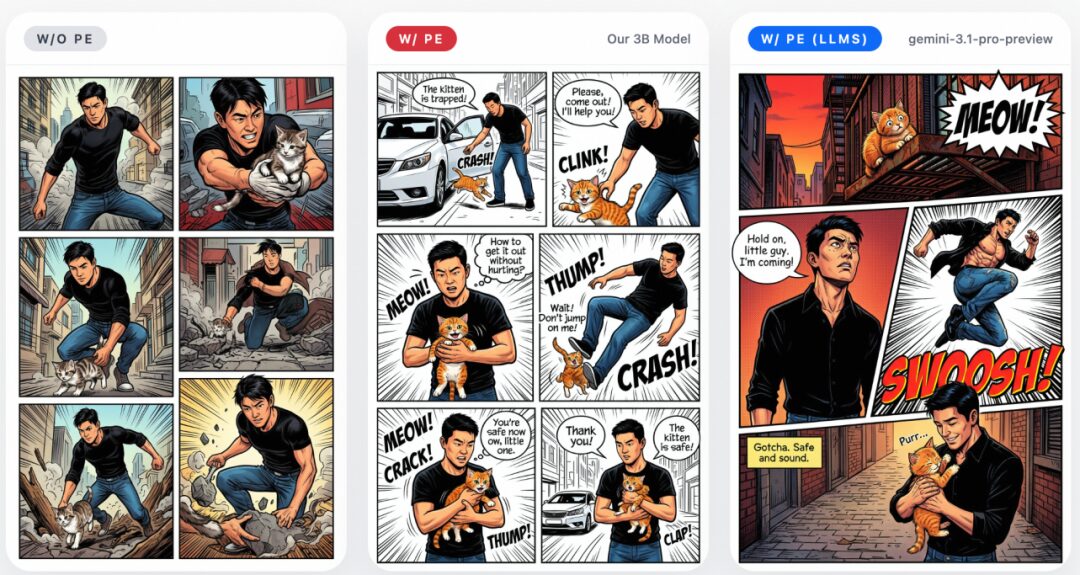
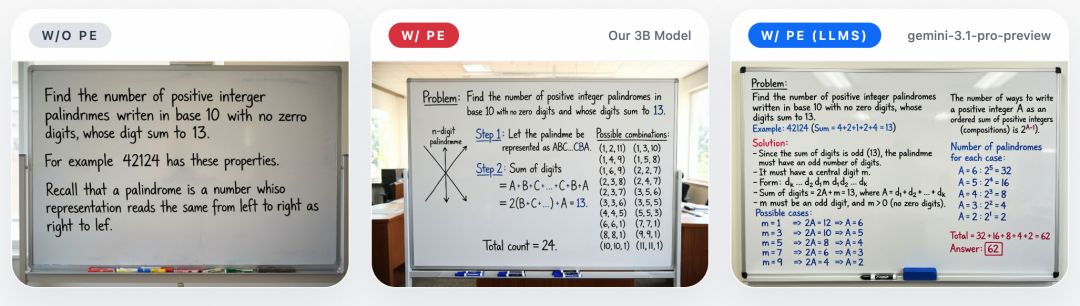
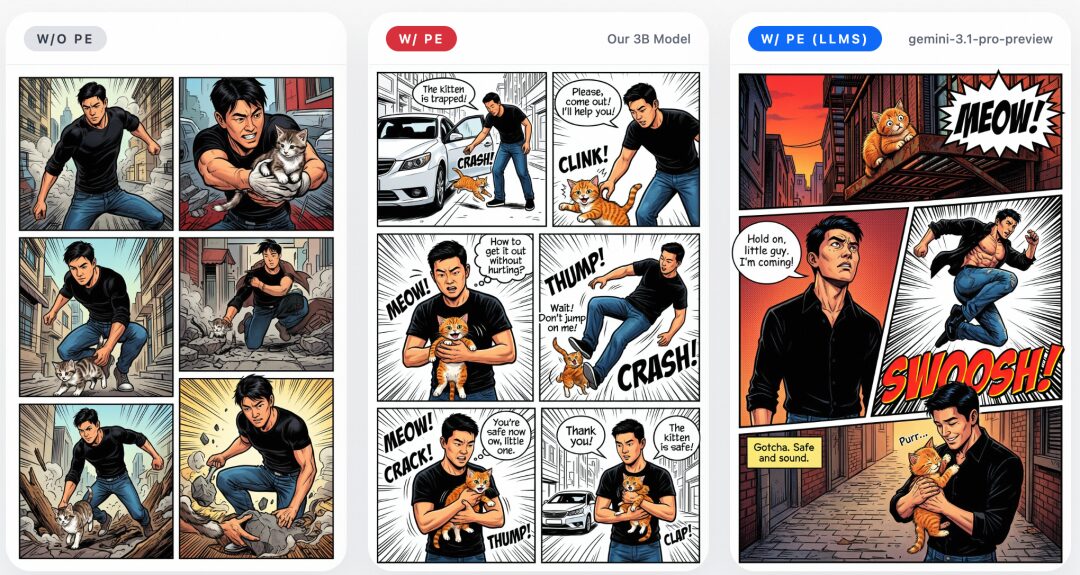
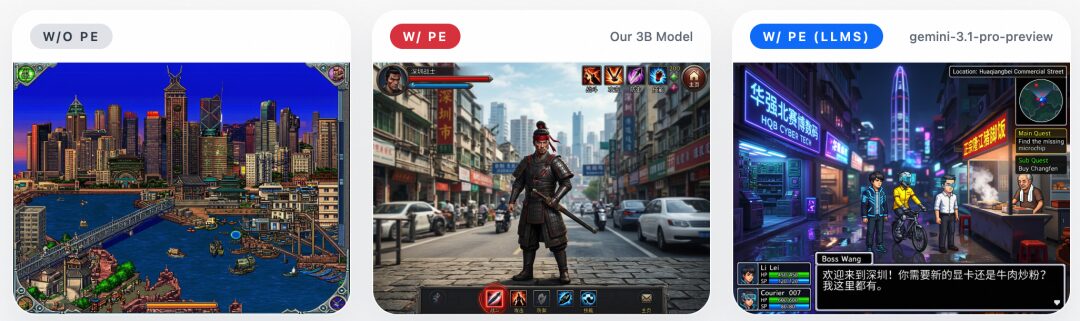
To address this, the team built in a lightweight 3B-parameter Prompt Enhancer that automatically expands short inputs into more detailed, structured prompts — without changing the user's intent, but transforming concise requests into forms that better unlock the model's potential. The effect is especially noticeable in structured visual tasks such as posters, anime, web layouts, and game screenshots.
The examples below show PE's effect: without PE, the model tends to take short prompts literally, producing incomplete results; with 3B PE enabled, generation quality improves significantly. Using stronger LLMs as PE can further improve results, showing that prompt enhancement is an effective lever for unlocking ERNIE-Image's long-prompt capabilities.

Benchmark Results
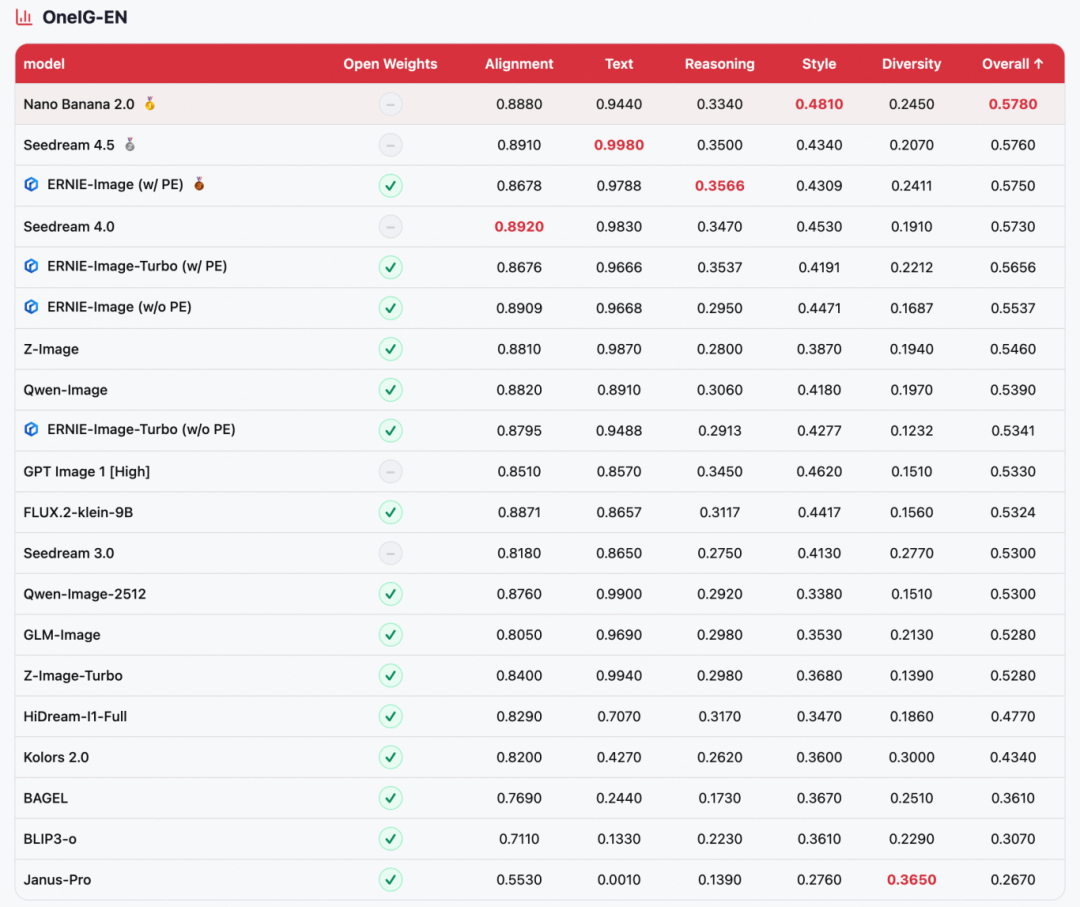
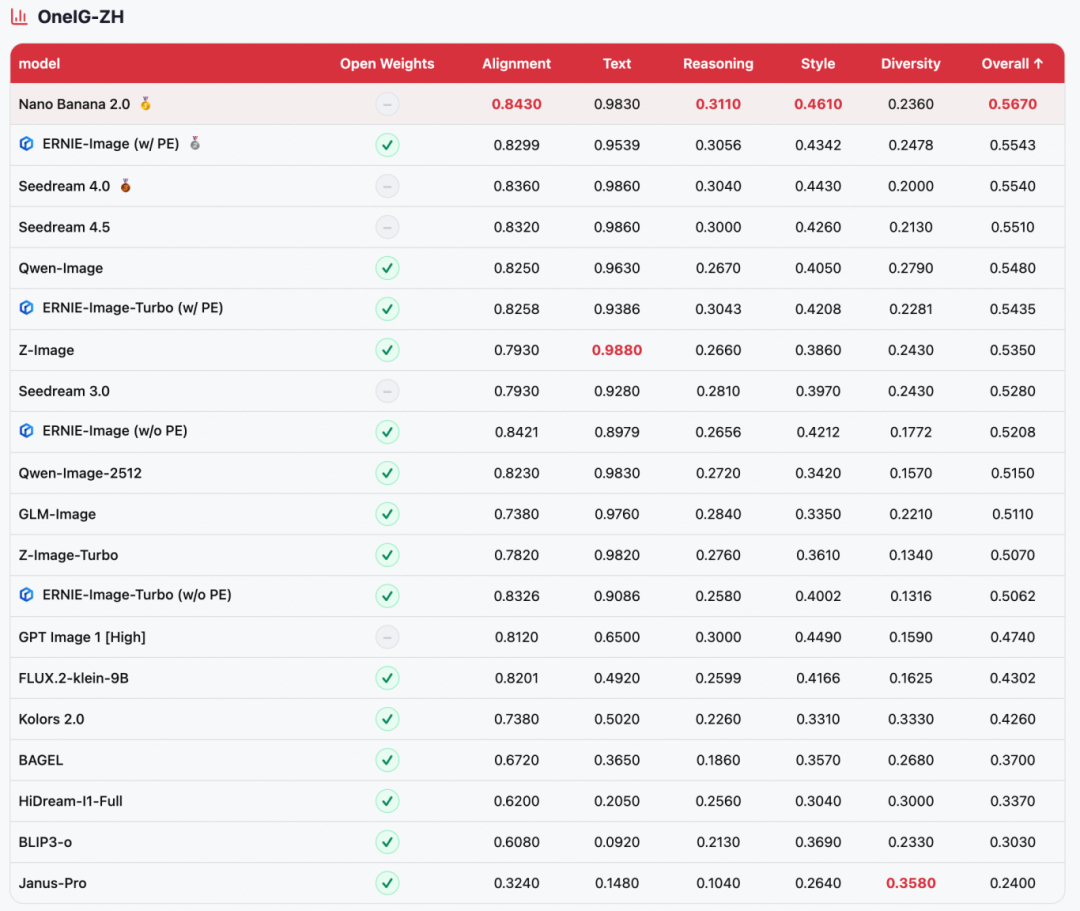
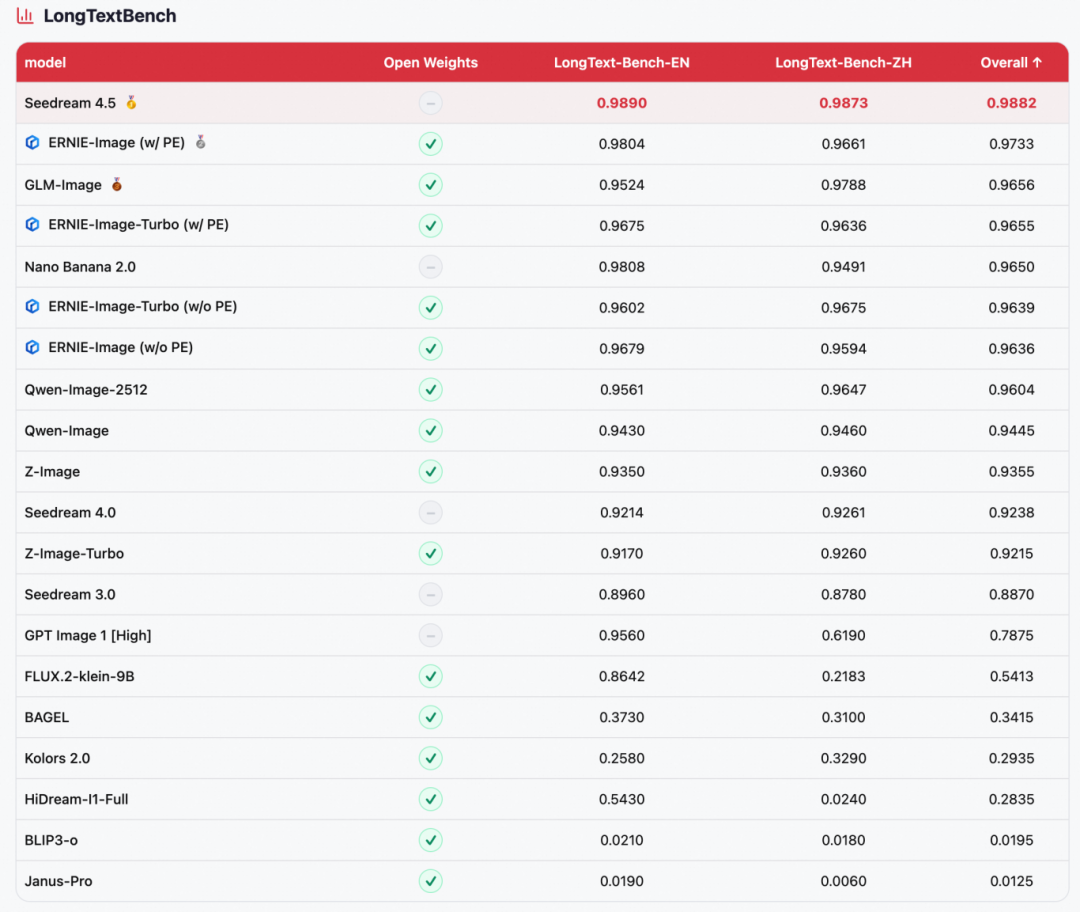
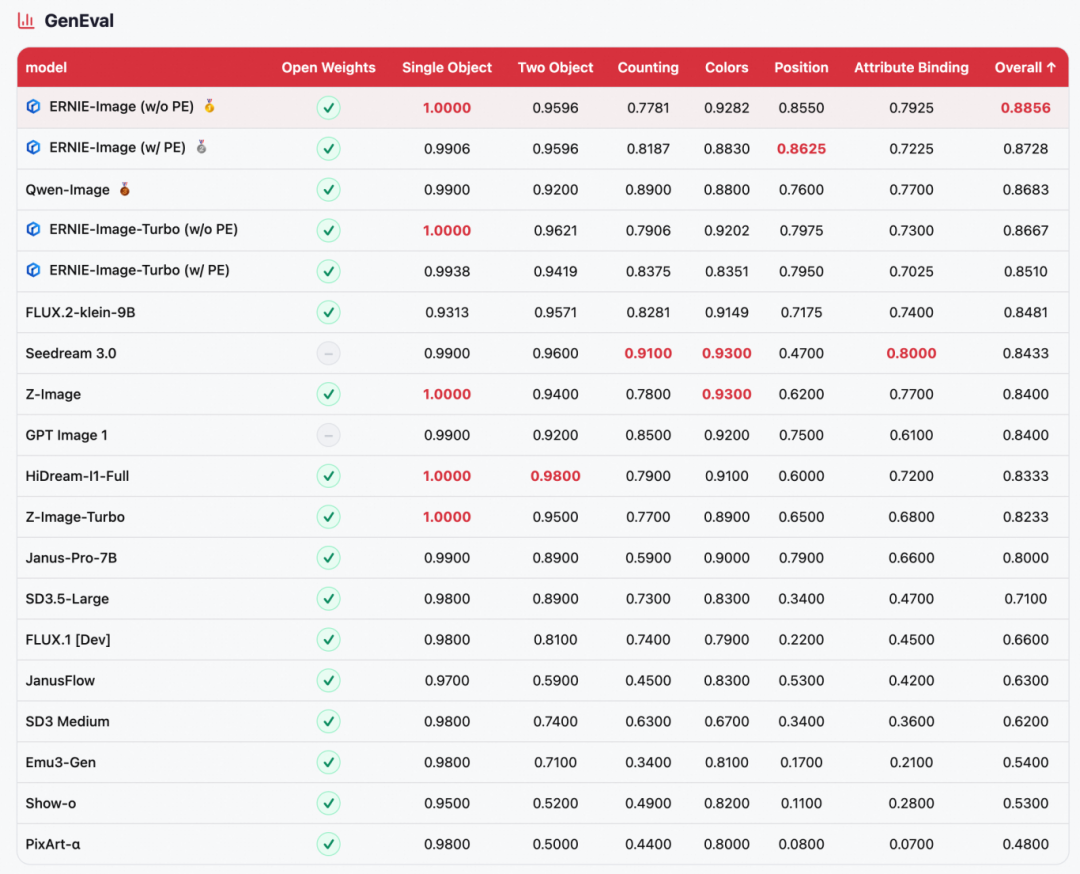
ERNIE-Image was evaluated on four mainstream text-to-image benchmarks: GenEval (compositional generation), OneIG-EN / OneIG-ZH (English/Chinese open-domain image generation), and LongTextBench (long text rendering fidelity).
Leading across open-source models
ERNIE-Image ranks #1 among open-source models on all four benchmarks: GenEval #1 (0.8856), OneIG-ZH #2 (0.5543), LongTextBench #2 (0.9733), OneIG-EN #3 (0.5750), competing directly with top closed-source models like NanoBanana 2.0 and Seedream 4.5.
Extreme parameter efficiency
These results come from an 8B-parameter DiT architecture, making it one of the most parameter-efficient models at this performance level.
Standout text rendering
Ranking #2 on LongTextBench, with excellent performance in both Chinese and English long text rendering. Also maintains high competitiveness on the Text dimension of OneIG, reflecting its core advantage in multilingual text generation.
Model Inference
Diffusers Inference
Install:
pip install git+https://github.com/huggingface/diffusers
Inference script:
import torch
from diffusers import ErnieImagePipeline
pipe = ErnieImagePipeline.from_pretrained(

"Baidu/ERNIE-Image-Turbo",

torch_dtype=torch.bfloat16,

).to("cuda")
image = pipe(

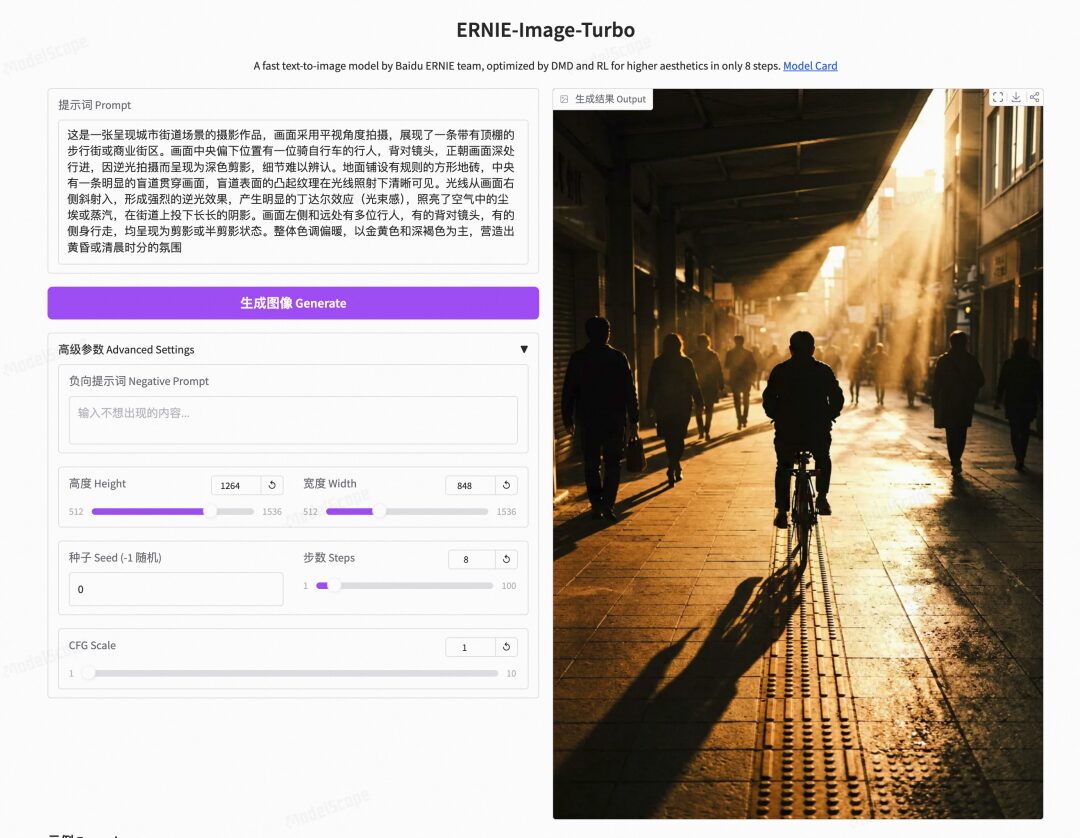
prompt="This is a photographic work presenting an urban street scene...",

height=1264,

width=848,

num_inference_steps=8,

guidance_scale=1.0,

use_pe=True  # use prompt enhancer

).images[0]
image.save("output.png")
SGLang Inference
Install sglang:
git clone https://github.com/sgl-project/sglang.git
Start service:
sglang serve --model-path baidu/ERNIE-Image-Turbo
Send generation request:
curl -X POST http://localhost:30000/generate \
  -H "Content-Type: application/json" \
  -d '{
    "prompt": "This is a photographic work presenting an urban street scene...",
    "height": 1264,
    "width": 848,
    "num_inference_steps": 8,
    "guidance_scale": 1.0,
    "use_pe": true
  }' \
  --output output.png
DiffSynth Inference
Install:
pip install -U diffsynth==2.0.8
The code below quickly loads the PaddlePaddle/ERNIE-Image model for inference. DiffSynth-Studio's VRAM management is enabled — the framework automatically controls model parameter loading based on remaining VRAM, running with as little as 3GB VRAM.
from diffsynth.pipelines.ernie_image import ErnieImagePipeline, ModelConfig
import torch
vram_config = {

"offload_dtype": torch.bfloat16,

"offload_device": "cpu",

"onload_dtype": torch.bfloat16,

"onload_device": "cpu",

"preparing_dtype": torch.bfloat16,

"preparing_device": "cuda",

"computation_dtype": torch.bfloat16,

"computation_device": "cuda",

}
pipe = ErnieImagePipeline.from_pretrained(

torch_dtype=torch.bfloat16,

device='cuda',

model_configs=[

ModelConfig(model_id="PaddlePaddle/ERNIE-Image", origin_file_pattern="transformer/diffusion_pytorch_model*.safetensors", **vram_config),

ModelConfig(model_id="PaddlePaddle/ERNIE-Image", origin_file_pattern="text_encoder/model.safetensors", **vram_config),

ModelConfig(model_id="PaddlePaddle/ERNIE-Image", origin_file_pattern="vae/diffusion_pytorch_model.safetensors", **vram_config),

],

tokenizer_config=ModelConfig(model_id="PaddlePaddle/ERNIE-Image", origin_file_pattern="tokenizer/"),

vram_limit=torch.cuda.mem_get_info("cuda")[1] / (1024 ** 3) - 0.5,

)
image = pipe(

prompt="A black-and-white Chinese rural dog",

negative_prompt="",

height=1024,

width=1024,

seed=42,

num_inference_steps=50,

cfg_scale=4.0,

)

image.save("output.jpg")
LoRA Training
DiffSynth-Studio also supports LoRA training for ERNIE-Image text-to-image models.
Install:
pip install -U diffsynth==2.0.8
Training script:
# Dataset: data/diffsynth_example_dataset/ernie_image/Ernie-Image-T2I/
# Download: modelscope download --dataset DiffSynth-Studio/diffsynth_example_dataset --include "ernie_image/Ernie-Image-T2I/*" --local_dir ./data/diffsynth_example_dataset
accelerate launch examples/ernie_image/model_training/train.py

--dataset_base_path data/diffsynth_example_dataset/ernie_image/Ernie-Image-T2I

--dataset_metadata_path data/diffsynth_example_dataset/ernie_image/Ernie-Image-T2I/metadata.csv

--max_pixels 1048576

--dataset_repeat 50

--model_id_with_origin_paths "PaddlePaddle/ERNIE-Image:transformer/diffusion_pytorch_model*.safetensors,PaddlePaddle/ERNIE-Image:text_encoder/model.safetensors,PaddlePaddle/ERNIE-Image:vae/diffusion_pytorch_model.safetensors"

--learning_rate 1e-4

--num_epochs 5

--remove_prefix_in_ckpt "pipe.dit."

--output_path "./models/train/Ernie-Image-T2I_lora"

--lora_base_model "dit"

--lora_target_modules "to_q,to_k,to_v,to_out.0"

--lora_rank 32

--use_gradient_checkpointing

--dataset_num_workers 8

--find_unused_parameters
Validation script:
import torch
from diffsynth.pipelines.ernie_image import ErnieImagePipeline, ModelConfig
from diffsynth.core.loader.file import load_state_dict
pipe = ErnieImagePipeline.from_pretrained(

torch_dtype=torch.bfloat16,

device="cuda",

model_configs=[

ModelConfig(model_id="PaddlePaddle/ERNIE-Image", origin_file_pattern="transformer/diffusion_pytorch_model*.safetensors"),

ModelConfig(model_id="PaddlePaddle/ERNIE-Image", origin_file_pattern="text_encoder/model.safetensors"),

ModelConfig(model_id="PaddlePaddle/ERNIE-Image", origin_file_pattern="vae/diffusion_pytorch_model.safetensors"),

],

)
lora_state_dict = load_state_dict("./models/train/Ernie-Image-T2I_lora/epoch-4.safetensors", torch_dtype=torch.bfloat16, device="cuda")

pipe.load_lora(pipe.dit, state_dict=lora_state_dict, alpha=1.0)
image = pipe(

prompt="a professional photo of a cute dog",

seed=0,

num_inference_steps=50,

cfg_scale=4.0,

)

image.save("image_lora.jpg")

print("LoRA validation image saved to image_lora.jpg")
Summary
ERNIE-Image proves that an 8B-parameter model can compete with larger models in text rendering, complex instruction following, structured generation, and diverse style expression, while maintaining practicality for consumer-grade hardware deployment. We hope the open-source ERNIE-Image and ERNIE-Image Turbo will serve as powerful foundational tools for research, development, and creative applications.