ERNIE-Image 8B Goes Open Source: Top-Tier Text-to-Image Generation and Precise Text Rendering with Just 8B Parameters
00
Introduction
Baidu’s ERNIE foundation model team has open-sourced ERNIE-Image, an 8B-parameter text-to-image model built on a single-stream DiT architecture. It can run on a consumer GPU with just 24GB of VRAM, and leads open-source models across mainstream benchmarks for instruction following and text rendering. It is especially strong in highly controllable scenarios such as posters, comic storyboards, and multi-panel layouts. The team also released ERNIE-Image Turbo, which can generate high-fidelity images in just 8 inference steps. The model weights and inference code are now fully open source, and ModelScope Studio provides a quick way to try it out.
Try it here:
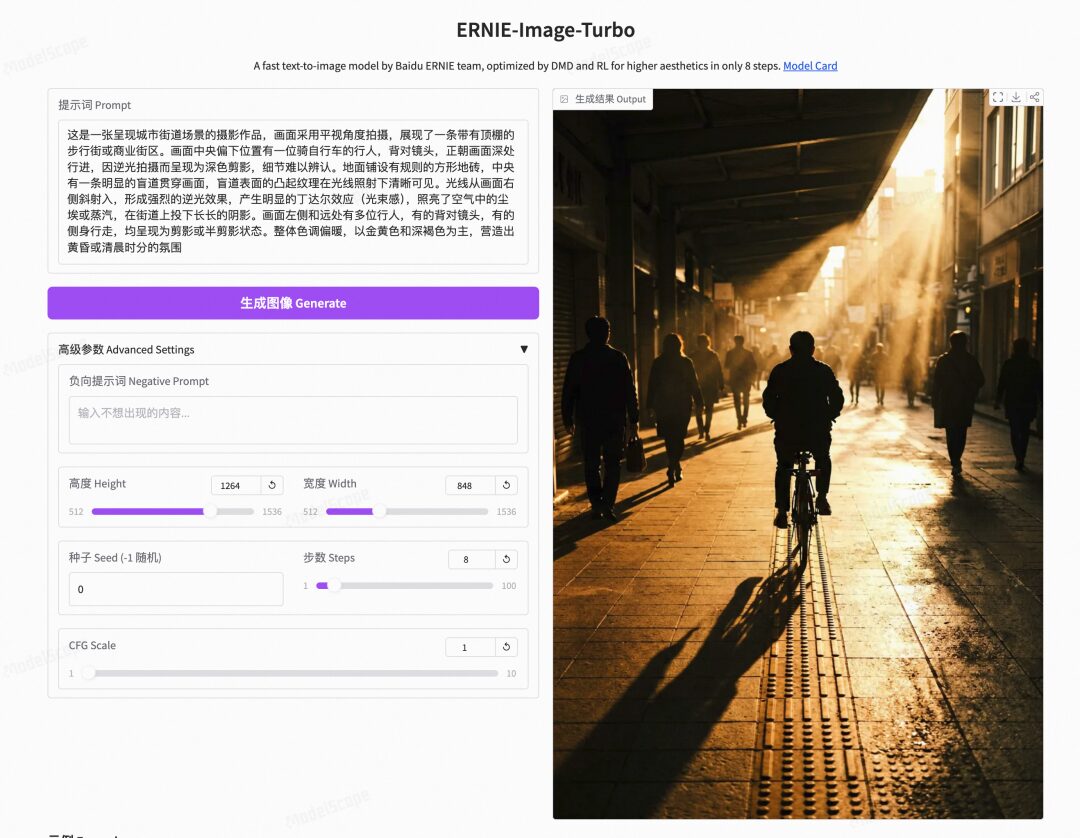
Open-source links:
- ERNIE-Image: https://modelscope.cn/models/PaddlePaddle/ERNIE-Image
- ERNIE-Image-Turbo: https://modelscope.cn/models/PaddlePaddle/ERNIE-Image-Turbo
01
Model Overview
ERNIE-Image is based on the DiT architecture and has 8 billion parameters (8B). With only 24GB of VRAM, it can generate complex images comparable to those from top commercial models. On major evaluations such as GenEval, OneIG, and LongTextBench, it consistently outperforms open-source models, with overall results approaching state-of-the-art systems such as NanoBanana and Seedream 4.5. The model shows clear advantages in complex instruction following and precise text rendering, while also supporting a wide range of visual styles including anime, film photography, surrealism, silhouettes, and old-photo aesthetics.
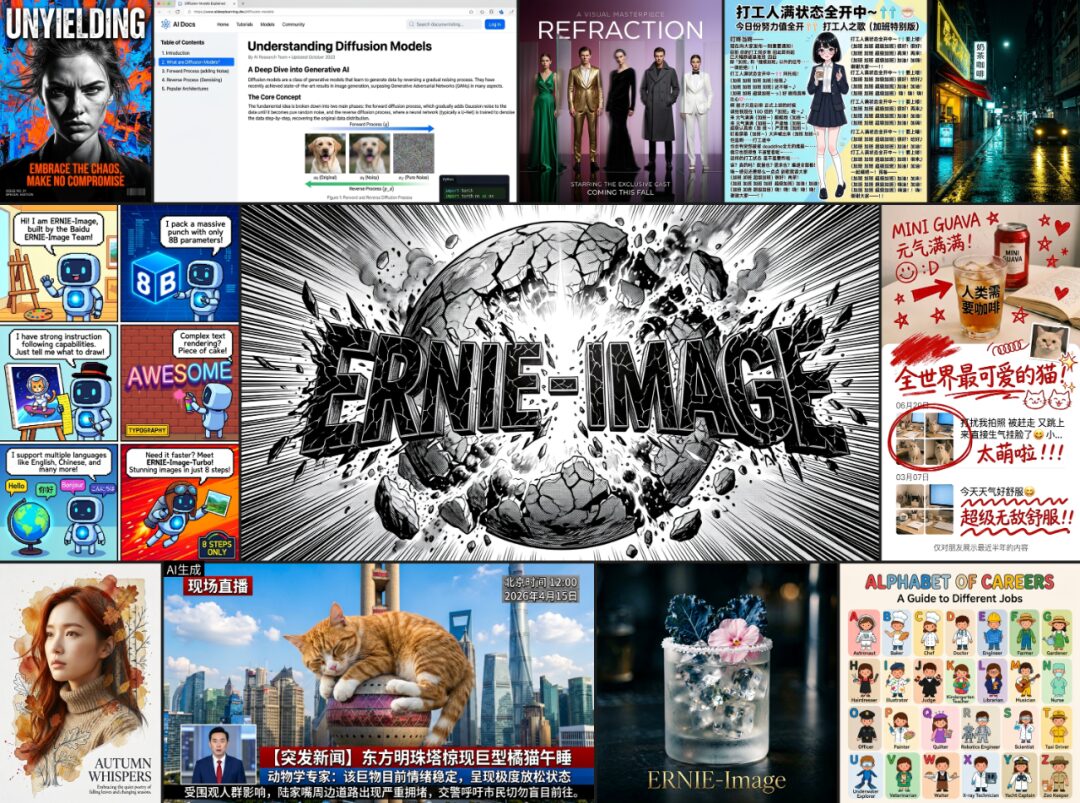
Core Features:
- Small model, strong performance
With only 8B parameters, it ranks first among open-source models on major benchmarks such as GenEval, OneIG, and LongTextBench, with performance close to the most advanced commercial-grade models. - Precise text rendering
It performs reliably on high-density text, long-text, and layout-sensitive text generation tasks, supports multilingual text rendering including Chinese and English, and is well suited for text-heavy scenarios such as posters, infographics, and UI-like images. - Complex instruction following
When given prompts involving multi-subject relationships, detailed constraints, and knowledge-intensive descriptions, the model maintains strong understanding and precise execution. - Outstanding structured generation
In structured visual tasks such as posters, comics, shots, storyboards, and multi-panel images, it better preserves layout logic and visual organization. - Broad style coverage
It supports many visual styles including realistic photography, design-oriented imagery, anime, film, surrealism, silhouettes, and old-photo looks, as well as softer and more cinematic aesthetics. - Friendly to consumer hardware
It can be deployed and run with 24GB of VRAM, lowering the barrier for both research and production use.
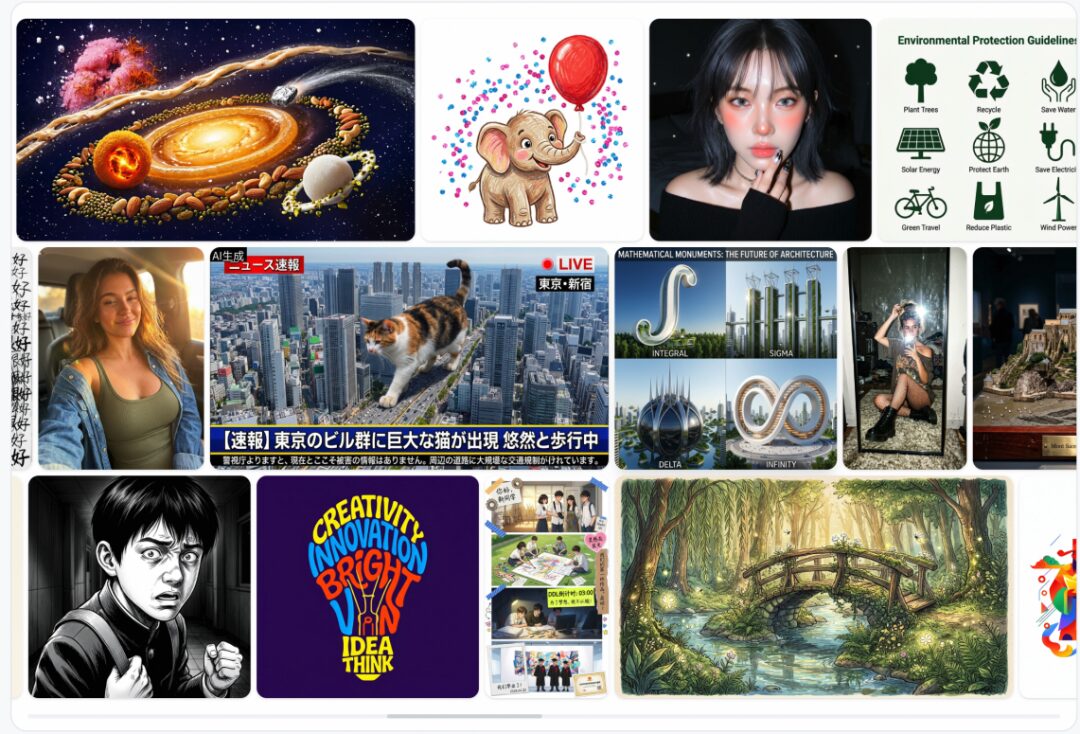
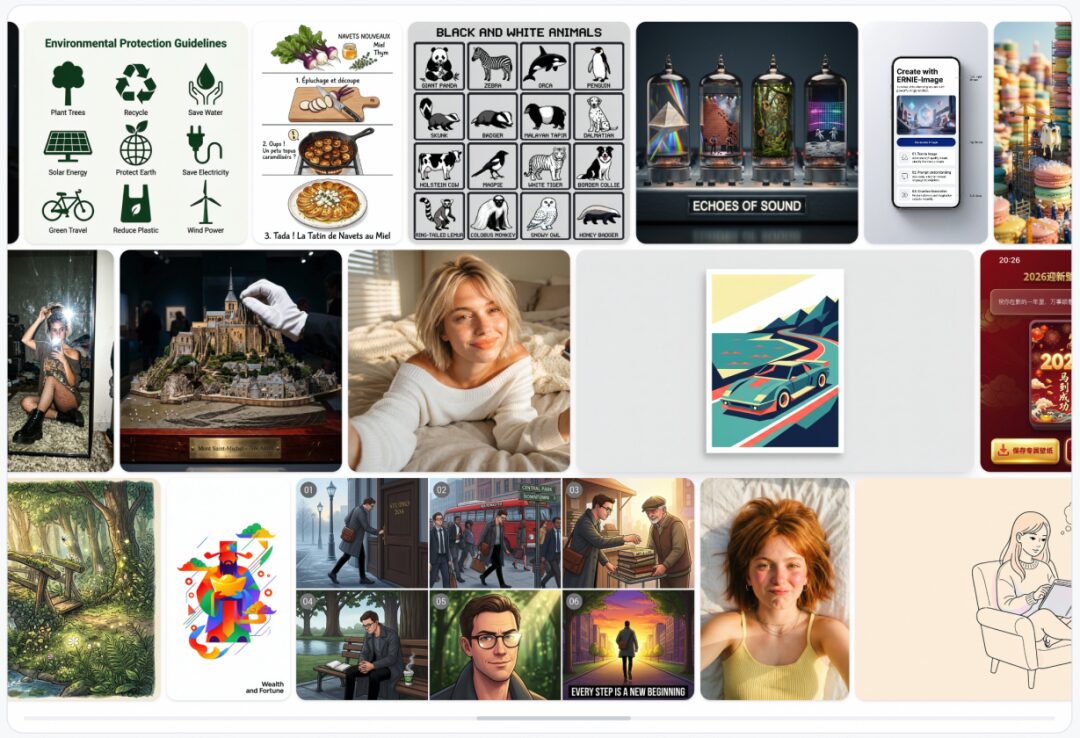
Swipe left or right to see more
Prompt Enhancer
ERNIE-Image performs best with detailed, structured long prompts, but in real-world use, users often enter only a short sentence, which makes it hard to fully unlock the model’s capabilities.
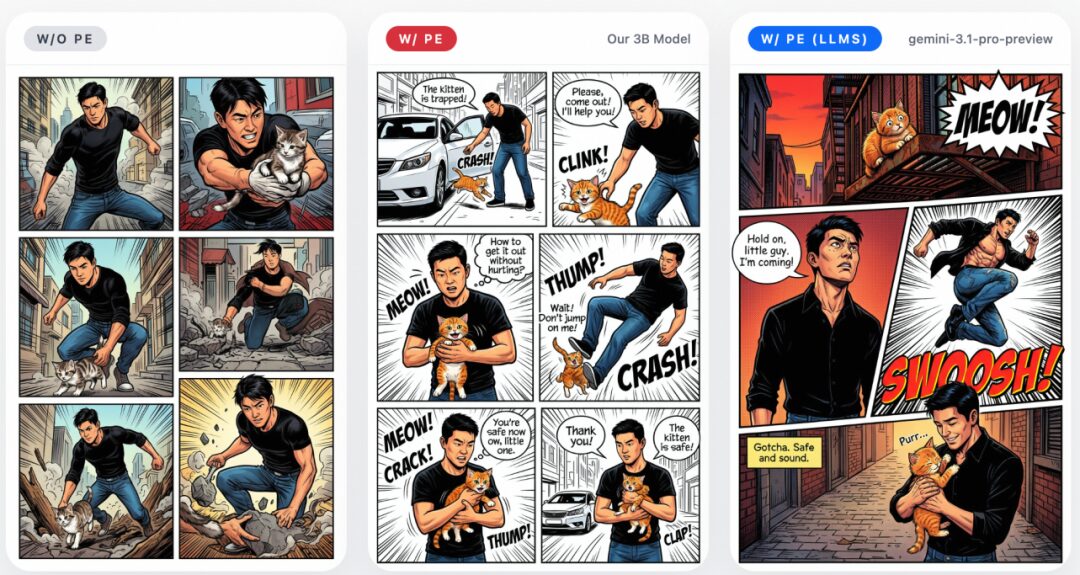
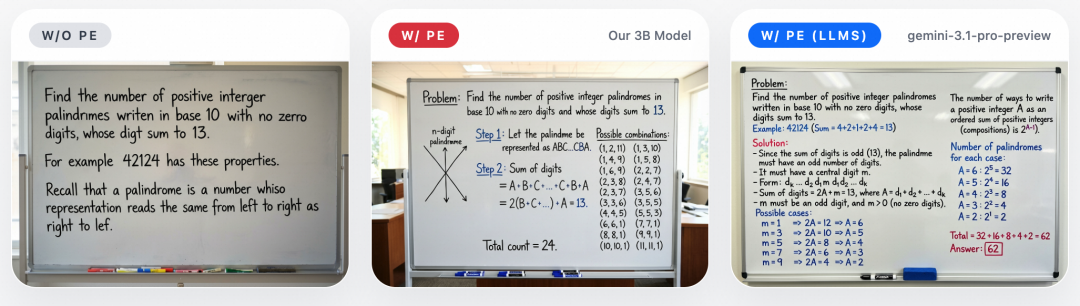
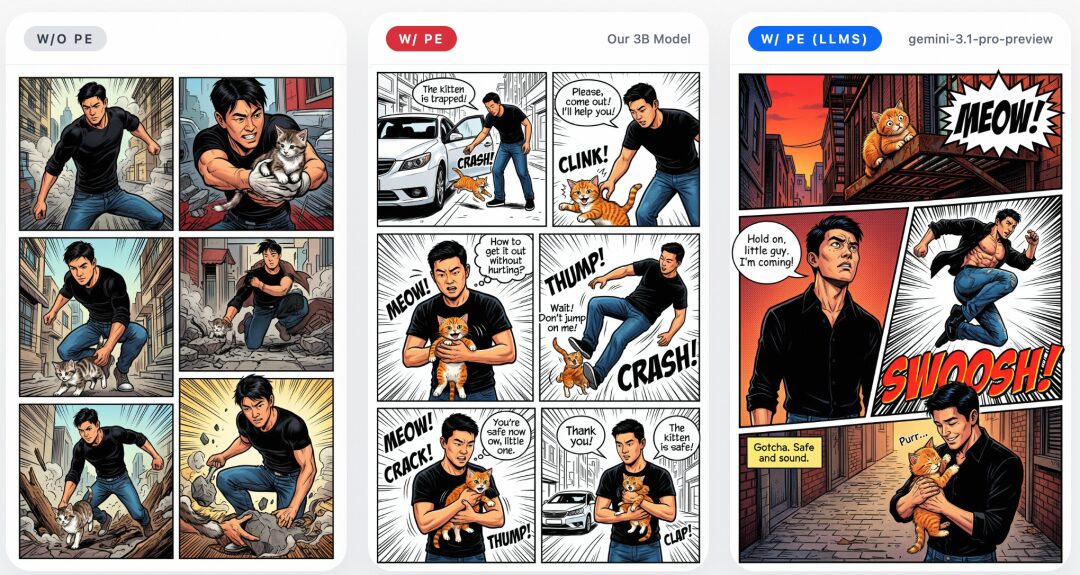
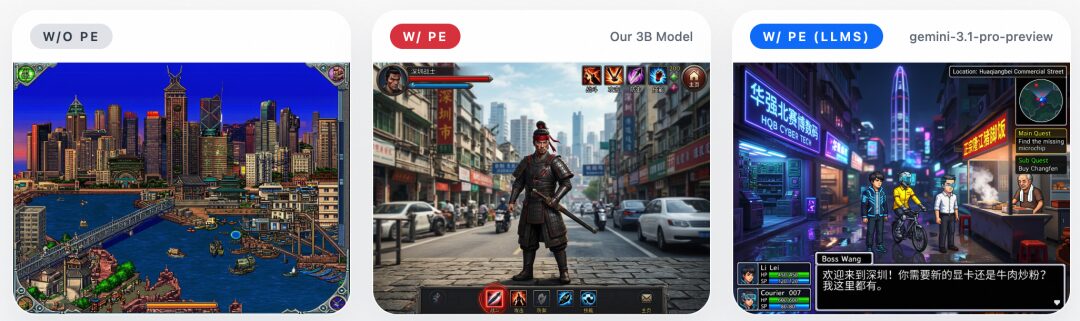
To address this, the team built in a lightweight 3B-parameter Prompt Enhancer that automatically expands short inputs into more detailed, structured prompts. It does not change the user’s intent, but instead transforms concise requests into a form that better brings out the model’s potential. The improvement is especially noticeable in structured visual tasks such as posters, anime, web layouts, and game screenshots.
The examples below show the effect of the Prompt Enhancer: without PE, the model tends to interpret short prompts too literally, leading to incomplete results; after enabling the 3B PE, generation quality improves significantly. Using a stronger LLM as the PE can further improve performance, showing that prompt enhancement is an effective lever for unlocking ERNIE-Image’s long-prompt capabilities.

Evaluation Results
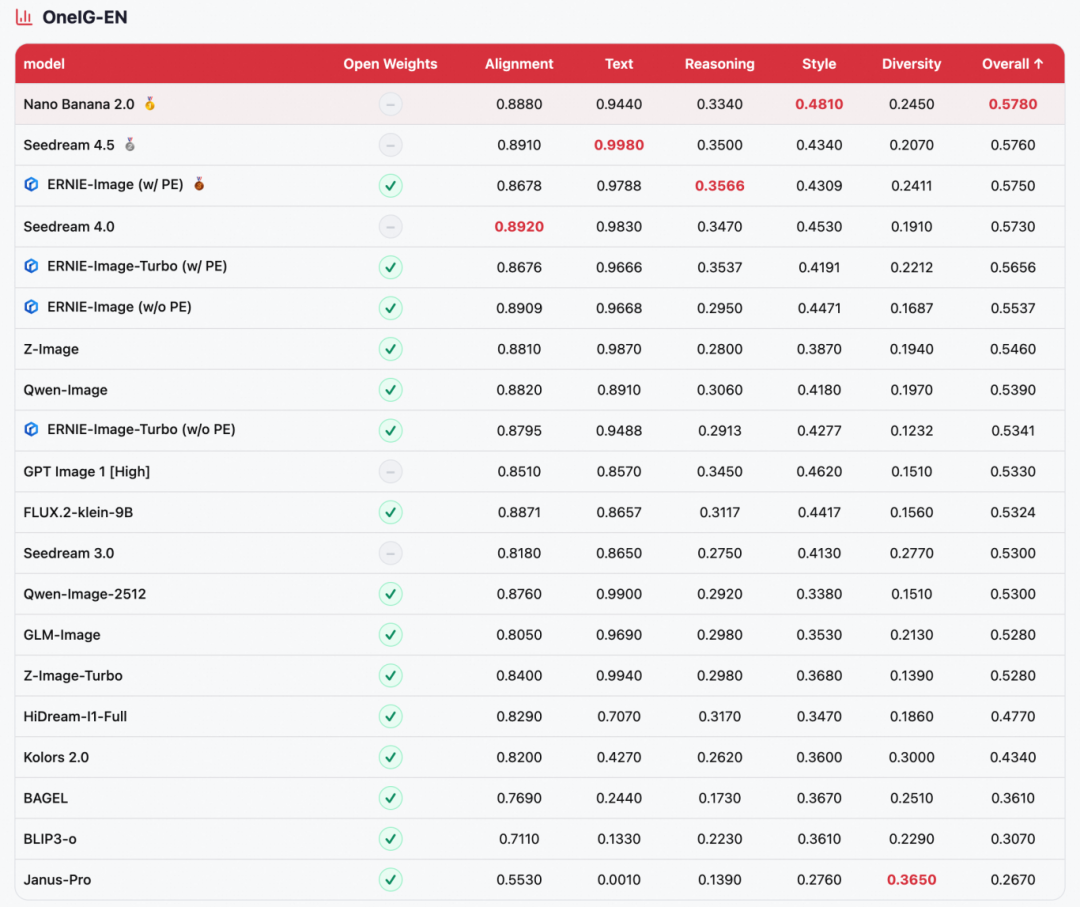
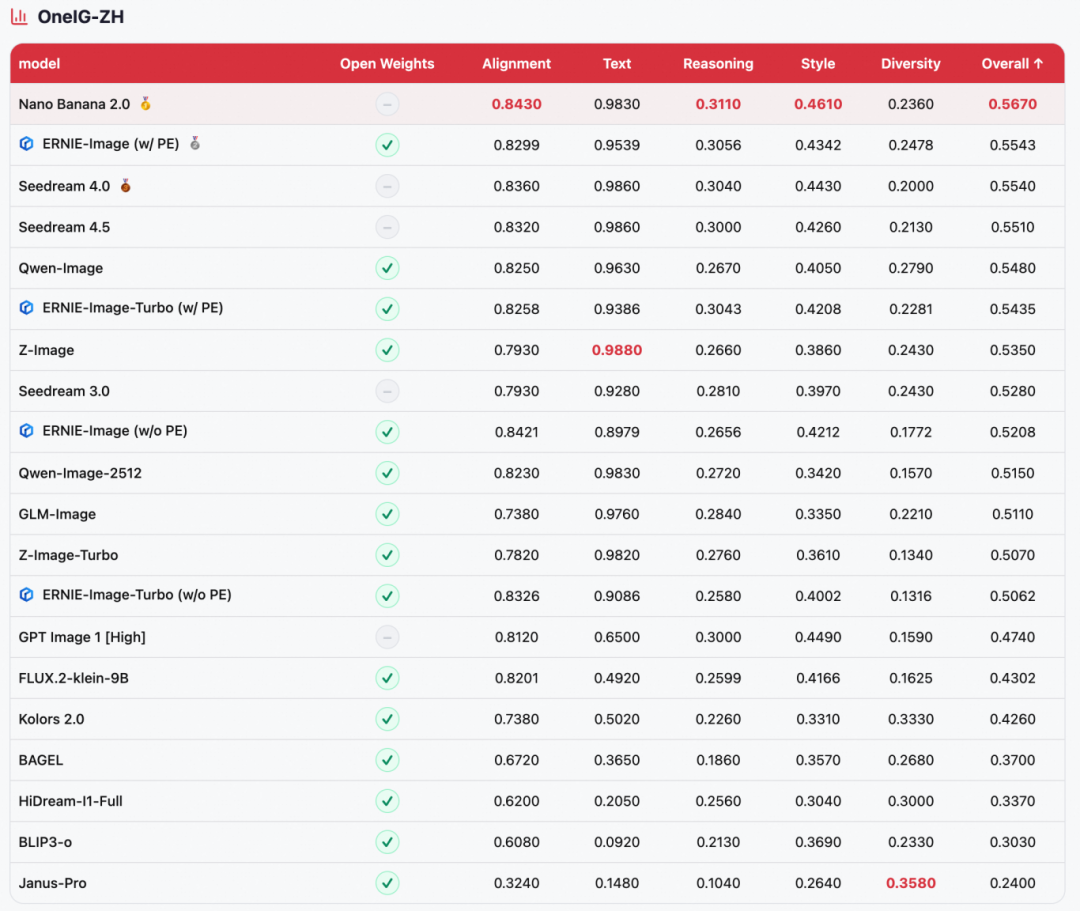
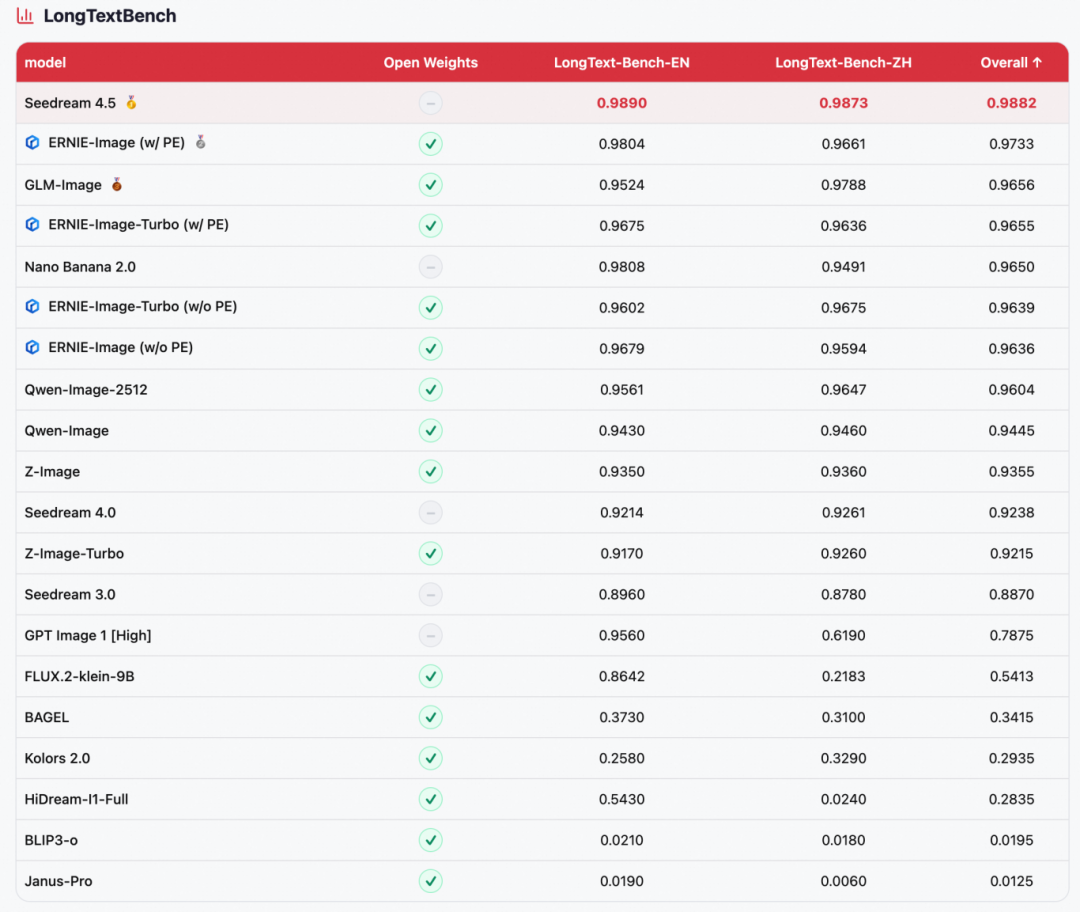
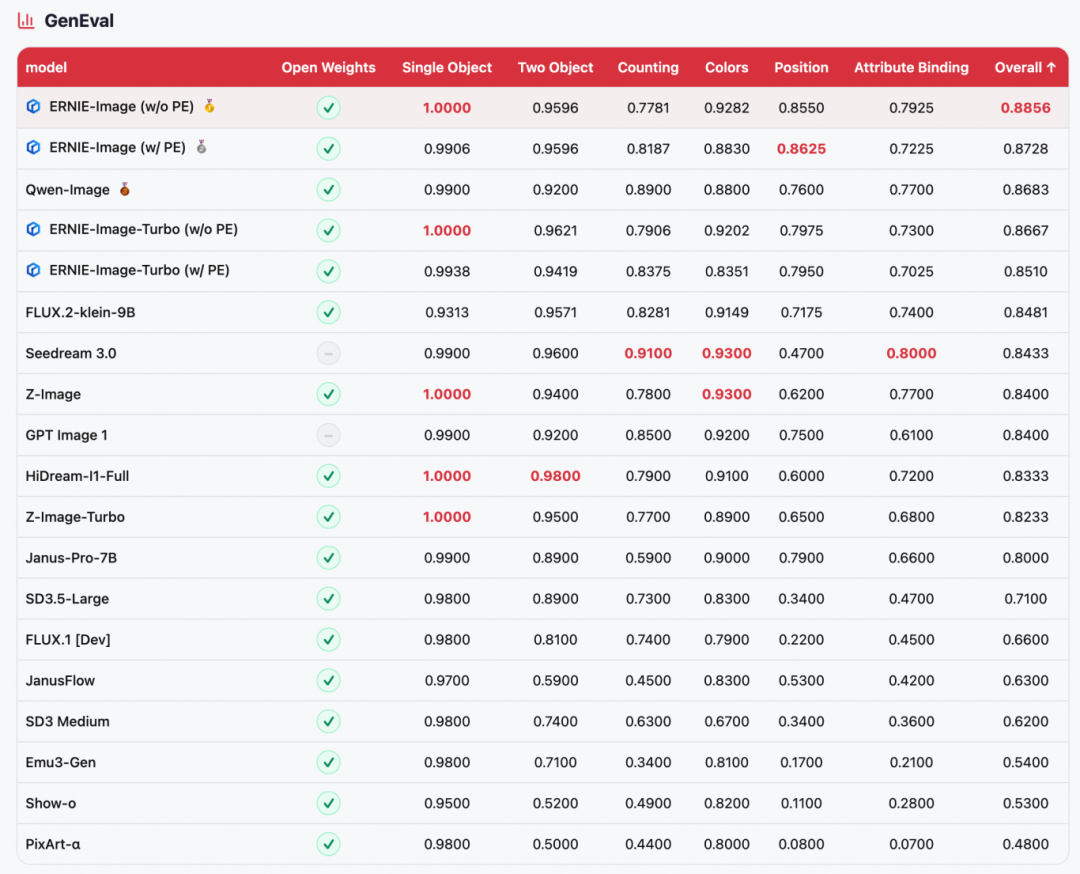
ERNIE-Image was evaluated on four mainstream text-to-image benchmarks: GenEval (compositional generation), OneIG-EN / OneIG-ZH (open-domain image generation in English and Chinese), and LongTextBench (long-text rendering fidelity).
- Across-the-board leadership among open-source models
ERNIE-Image ranks first among open-source models on all four benchmarks: 1st on GenEval (0.8856), 2nd on OneIG-ZH (0.5543), 2nd on LongTextBench (0.9733), and 3rd on OneIG-EN (0.5750), directly competing with top closed-source models such as NanoBanana 2.0 and Seedream 4.5. - Extreme parameter efficiency
These results come from an 8B-parameter DiT architecture alone, making it one of the most parameter-efficient models at this performance level. - Strong text rendering
It ranks 2nd on LongTextBench, with excellent performance on long-text rendering in both Chinese and English; it also remains highly competitive on the Text dimension of OneIG, highlighting its core strength in multilingual text generation.
Swipe left or right to see more
02
Model Inference
Diffusers Inference
Environment setup:
pip install git+https://github.com/huggingface/diffusers
Inference script:
import torch
from diffusers import ErnieImagePipeline
pipe = ErnieImagePipeline.from_pretrained(
    "Baidu/ERNIE-Image-Turbo",
    torch_dtype=torch.bfloat16,
).to("cuda")
image = pipe(
    prompt="这是一张呈现城市街道场景的摄影作品,画面采用平视角度拍摄,展现了一条带有顶棚的步行街或商业街区。画面中央偏下位置有一位骑自行车的行人,背对镜头,正朝画面深处行进,因逆光拍摄而呈现为深色剪影,细节难以辨认。地面铺设有规则的方形地砖,中央有一条明显的盲道贯穿画面,盲道表面的凸起纹理在光线照射下清晰可见。光线从画面右侧斜射入,形成强烈的逆光效果,产生明显的丁达尔效应(光束感),照亮了空气中的尘埃或蒸汽,在街道上投下长长的阴影。画面左侧和远处有多位行人,有的背对镜头,有的侧身行走,均呈现为剪影或半剪影状态。整体色调偏暖,以金黄色和深褐色为主,营造出黄昏或清晨时分的氛围。",
    height=1264,
    width=848,
    num_inference_steps=8,
    guidance_scale=1.0,
    use_pe=True # use prompt enhancer
).images[0]
image.save("output.png")
SGLang Inference
Install sglang:
git clone https://github.com/sgl-project/sglang.git

# Start the service:
sglang serve --model-path baidu/ERNIE-Image-Turbo

# Send a generation request:
curl -X POST http://localhost:30000/generate \
  -H "Content-Type: application/json" \
  -d '{
    "prompt": "这是一张呈现城市街道场景的摄影作品,画面采用平视角度拍摄,展现了一条带有顶棚的步行街或商业街区。画面中央偏下位置有一位骑自行车的行人,背对镜头,正朝画面深处行进,因逆光拍摄而呈现为深色剪影,细节难以辨认。地面铺设有规则的方形地砖,中央有一条明显的盲道贯穿画面,盲道表面的凸起纹理在光线照射下清晰可见。光线从画面右侧斜射入,形成强烈的逆光效果,产生明显的丁达尔效应(光束感),照亮了空气中的尘埃或蒸汽,在街道上投下长长的阴影。画面左侧和远处有多位行人,有的背对镜头,有的侧身行走,均呈现为剪影或半剪影状态。整体色调偏暖,以金黄色和深褐色为主,营造出黄昏或清晨时分的氛围。",
    "height": 1264,
    "width": 848,
    "num_inference_steps": 8,
    "guidance_scale": 1.0,
    "use_pe": true
  }' \
  --output output.png
Diffsynth Inference
Environment setup:
pip install -U diffsynth==2.0.8
Run the following code to quickly load the PaddlePaddle/ERNIE-Image model and perform inference. DiffSynth-Studio’s VRAM management is enabled, and the framework will automatically control model parameter loading based on available VRAM. It can run with as little as 3GB of VRAM.
from diffsynth.pipelines.ernie_image import ErnieImagePipeline, ModelConfig
import torch
vram_config = {
    "offload_dtype": torch.bfloat16,
    "offload_device": "cpu",
    "onload_dtype": torch.bfloat16,
    "onload_device": "cpu",
    "preparing_dtype": torch.bfloat16,
    "preparing_device": "cuda",
    "computation_dtype": torch.bfloat16,
    "computation_device": "cuda",
}
pipe = ErnieImagePipeline.from_pretrained(
    torch_dtype=torch.bfloat16,
    device='cuda',
    model_configs=[
        ModelConfig(model_id="PaddlePaddle/ERNIE-Image", origin_file_pattern="transformer/diffusion_pytorch_model*.safetensors", **vram_config),
        ModelConfig(model_id="PaddlePaddle/ERNIE-Image", origin_file_pattern="text_encoder/model.safetensors", **vram_config),
        ModelConfig(model_id="PaddlePaddle/ERNIE-Image", origin_file_pattern="vae/diffusion_pytorch_model.safetensors", **vram_config),
    ],
    tokenizer_config=ModelConfig(model_id="PaddlePaddle/ERNIE-Image", origin_file_pattern="tokenizer/"),
    vram_limit=torch.cuda.mem_get_info("cuda")[1] / (1024 ** 3) - 0.5,
)
image = pipe(
    prompt="一只黑白相间的中华田园犬",
    negative_prompt="",
    height=1024,
    width=1024,
    seed=42,
    num_inference_steps=50,
    cfg_scale=4.0,
)
image.save("output.jpg")
03
Model LoRA Training
DiffSynth-Studio also supports text-to-image LoRA training for the ERNIE-Image model.
Environment setup:
pip install -U diffsynth==2.0.8
Training script:
# Dataset: data/diffsynth_example_dataset/ernie_image/Ernie-Image-T2I/
# Download: modelscope download --dataset DiffSynth-Studio/diffsynth_example_dataset --include "ernie_image/Ernie-Image-T2I/*" --local_dir ./data/diffsynth_example_dataset
accelerate launch examples/ernie_image/model_training/train.py \
  --dataset_base_path data/diffsynth_example_dataset/ernie_image/Ernie-Image-T2I \
  --dataset_metadata_path data/diffsynth_example_dataset/ernie_image/Ernie-Image-T2I/metadata.csv \
  --max_pixels 1048576 \
  --dataset_repeat 50 \
  --model_id_with_origin_paths "PaddlePaddle/ERNIE-Image:transformer/diffusion_pytorch_model*.safetensors,PaddlePaddle/ERNIE-Image:text_encoder/model.safetensors,PaddlePaddle/ERNIE-Image:vae/diffusion_pytorch_model.safetensors" \
  --learning_rate 1e-4 \
  --num_epochs 5 \
  --remove_prefix_in_ckpt "pipe.dit." \
  --output_path "./models/train/Ernie-Image-T2I_lora" \
  --lora_base_model "dit" \
  --lora_target_modules "to_q,to_k,to_v,to_out.0" \
  --lora_rank 32 \
  --use_gradient_checkpointing \
  --dataset_num_workers 8 \
  --find_unused_parameters
Validation script:
import torch
from diffsynth.pipelines.ernie_image import ErnieImagePipeline, ModelConfig
from diffsynth.core.loader.file import load_state_dict
pipe = ErnieImagePipeline.from_pretrained(
    torch_dtype=torch.bfloat16,
    device="cuda",
    model_configs=[
        ModelConfig(model_id="PaddlePaddle/ERNIE-Image", origin_file_pattern="transformer/diffusion_pytorch_model*.safetensors"),
        ModelConfig(model_id="PaddlePaddle/ERNIE-Image", origin_file_pattern="text_encoder/model.safetensors"),
        ModelConfig(model_id="PaddlePaddle/ERNIE-Image", origin_file_pattern="vae/diffusion_pytorch_model.safetensors"),
    ],
)
lora_state_dict = load_state_dict("./models/train/Ernie-Image-T2I_lora/epoch-4.safetensors", torch_dtype=torch.bfloat16, device="cuda")
pipe.load_lora(pipe.dit, state_dict=lora_state_dict, alpha=1.0)
image = pipe(
    prompt="a professional photo of a cute dog",
    seed=0,
    num_inference_steps=50,
    cfg_scale=4.0,
)
image.save("image_lora.jpg")
print("LoRA validation image saved to image_lora.jpg")
04
Conclusion
ERNIE-Image demonstrates that an 8B-parameter model can compete with much larger models in text rendering, complex instruction following, structured generation, and diverse stylistic expression, while still remaining practical to deploy on consumer hardware. We hope that the open-source ERNIE-Image and ERNIE-Image Turbo will provide strong foundational tools for research, development, and creative applications.
Click “Read the original article” to jump to the model collection.